PX7 VIDEO COMPRESS

PX7 Video Compress

A video compressor for Mac with an exact target file size. Compare the result, then compress one video or a whole folder locally.

Version 1.0.4 · macOS 14 or later · Apple silicon or Intel · No card required

PX7 Video Compress
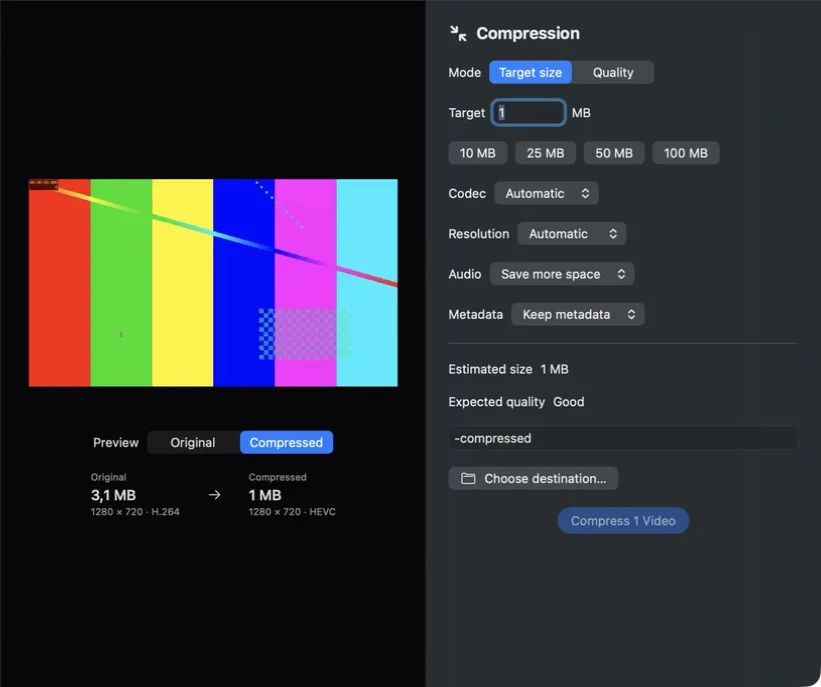
PX7 Video Compress comparing a 3.1 MB original with a 1 MB target and showing codec, resolution, audio, metadata and expected quality controls

Exact target size.

Before and after.

Whole folders.

No upload.
Original 684 MB 4K · H.264
Compressed 50 MB 1080p · HEVC
01

Name the size

Enter 10 MB, 25 MB, 50 MB—or any limit you need. Compress plans the video and audio budget before it starts.

02

See before and after

Preview the original and compressed result before processing the full file. Estimated size, resolution and codec stay visible.

03

Drop in a folder

Compress one video or hundreds with the same settings. Originals remain untouched and output names never overwrite existing files.

04

Let the app decide

Automatic mode chooses a sensible H.264 or HEVC output and downscales only when the target needs it. Manual controls remain available.

05

Keep, shrink or remove audio

Preserve audio quality, make it more compact, or remove it entirely. The estimate updates with the choice.

06

Keep private details private

Preserve metadata when it matters or strip it from the exported copy. Every frame stays on your Mac.

LOCAL FROM START TO FINISH

Your video never leaves your Mac.

No upload, account or subscription. Compression uses Apple’s native media engine and works directly with your local files.

Feature summary

PX7 Video Compress

VERSION 1.0.4

Smaller file. Same story.

A focused native Mac compressor with exact target sizes, batch processing and a real before/after preview.

Quick answers

Questions about PX7 Video Compress

What is PX7 Video Compress?
Compress videos on your Mac to a target file size or quality. Compare the result first and try PX7 Video Compress free for 7 days—no card required.
Where does PX7 Video Compress do its work?
PX7 Video Compress processes video locally on your Mac.
How much does PX7 Video Compress cost?
PX7 Video Compress costs €15 once. It includes a seven-day trial, and one app-specific key can be used on up to seven Macs. There is no subscription.
Which Macs can run PX7 Video Compress?
macOS 14 or later, Apple silicon or Intel
How do I make a video file smaller on a Mac?
Name the file size you need and the video is compressed to fit it, rather than guessing at a bitrate and checking afterwards. PX7 Video Compress can also work the other way, from a quality target.
How do I compress a video without losing quality?
Compression always trades some detail for size, so the useful question is how little you can give up. Working from a target lets the app pick settings that fit while keeping as much as possible, and you can compare before and after before committing.
Can I compress a whole folder of videos at once?
Yes. Drop in a folder and every video is processed with the same target, instead of one at a time.
Can I remove or shrink the audio to save space?
Yes — audio can be kept as it is, re-encoded smaller, or removed entirely, which matters when the sound is not needed.